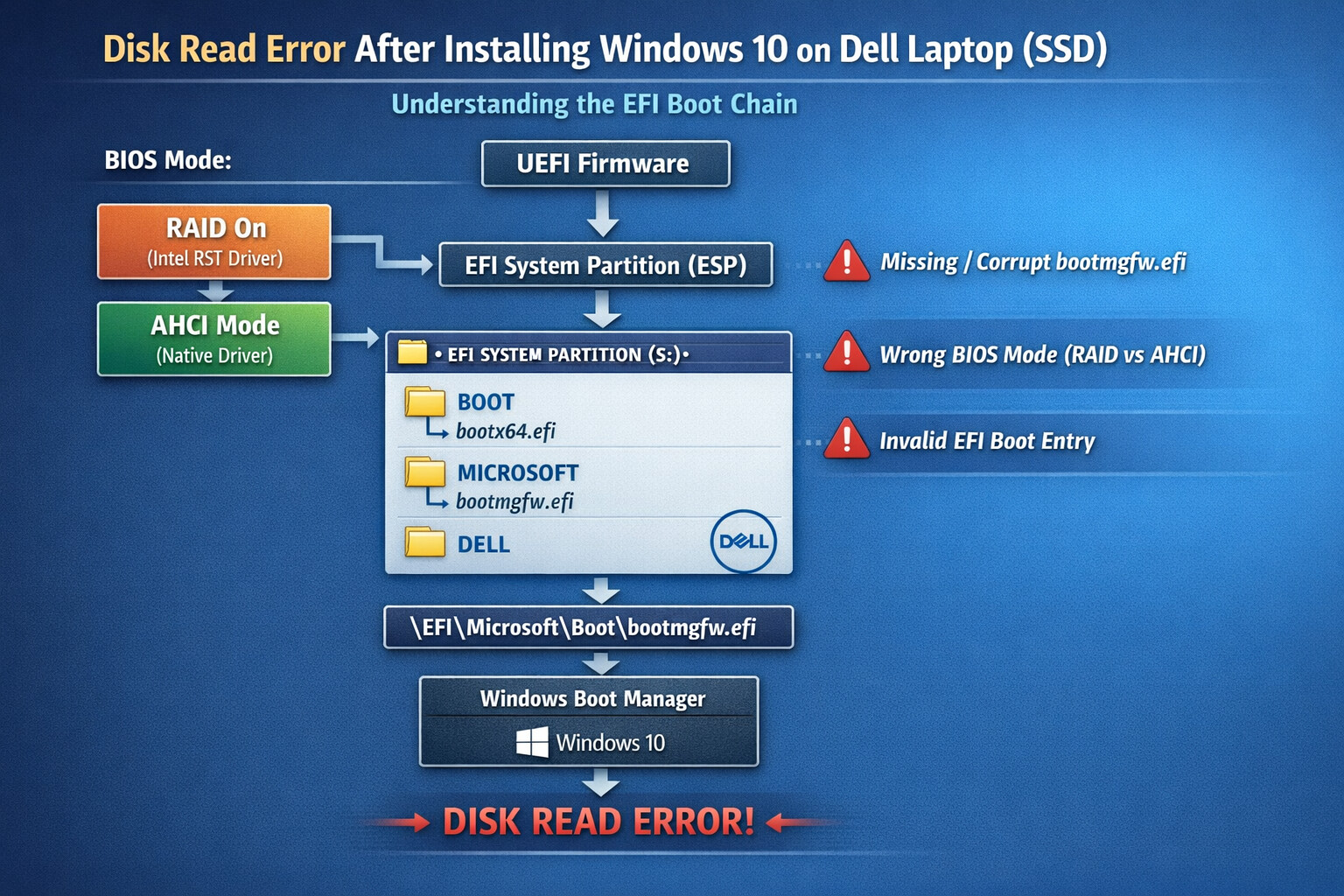
Disk Read Error After Installing Windows 10 on a Dell Laptop (SSD): Causes, Fixes, and the EFI Boot Mystery
Installing Windows 10 on a Dell laptop with an SSD should be a smooth sprint. Yet for many users, the journey ends abruptly with a chilling message:
“Disk Read Error – Press Ctrl+Alt+Del to Restart”
Strangely, the same SSD may work perfectly when the BIOS is switched from RAID On to AHCI. This is not black magic. It’s a boot architecture mismatch. Let’s break it down layer by layer.
1. The Common Scenario
Typical setup when the error appears:
- Dell Latitude / Inspiron / XPS laptop
- SSD (NVMe or SATA)
- Windows 10 installed successfully
- BIOS set to RAID On
- Boot fails with Disk Read Error
- Switching to AHCI suddenly fixes everything
So what’s really happening?
2. RAID vs AHCI: The Silent Saboteur
Dell ships most laptops with RAID On enabled by default, even when there’s only one SSD.
Why this matters
- Windows Setup behaves differently under RAID and AHCI
- RAID mode requires Intel RST drivers
- If Windows is installed without the correct RAID driver, the OS installs but cannot boot properly
The SSD itself is healthy. The bootloader just can’t speak the right language.
3. UEFI, GPT, and the Boot Chain
Modern Dell laptops use:
- UEFI firmware
- GPT partition scheme
- EFI System Partition (ESP)
The real boot process looks like this:
UEFI Firmware
   ↓
EFI System Partition (ESP)
   ↓
\EFI\Microsoft\Boot\bootmgfw.efi
   ↓
Windows Kernel
If any link in this chain is broken, you get a disk read error.
4. What Is /windows/boot/efi/bootmgfw.efi?
This file is the Windows Boot Manager (UEFI version).
-
Location (actual ESP path):
\EFI\Microsoft\Boot\bootmgfw.efi -
Purpose:
- It tells UEFI how to load Windows
- Think of it as the conductor of the boot orchestra

If this file:
- is missing
- is corrupted
- is not registered in UEFI
- or points to the wrong disk mode
Booting fails.
5. Default EFI Boot Directory Explained
A healthy EFI System Partition usually contains:
EFI
 ├── Boot
 │   └── bootx64.efi   (fallback loader)
 ├── Microsoft
 │   └── Boot
 │       └── bootmgfw.efi
 └── Dell (sometimes)
Important details
bootmgfw.efiis the primary Windows boot filebootx64.efiis a fallback if firmware can’t find Microsoft’s loader- Some Dell BIOS versions prefer one over the other
If the ESP is damaged or not detected under RAID mode, UEFI can’t find these files.
6. Why AHCI “Magically” Fixes the Problem
When you switch BIOS from RAID On → AHCI:
- Windows uses native AHCI drivers
- No Intel RST dependency
- The bootloader can finally see the SSD
- EFI paths resolve correctly
This doesn’t repair the bootloader. It simply avoids the RAID driver mismatch.
7. Proper Fixes (Not Just Workarounds)
Fix 1: Install Windows with RAID Drivers (Best Practice)
If you want to keep RAID On:
-
Download Intel Rapid Storage Technology (IRST) driver from Dell
-
During Windows installation:
- Click Load Driver
- Load IRST driver
-
Install Windows normally
This ensures:
- Correct disk detection
- Proper EFI boot registration
- No disk read error later
Fix 2: Convert Existing Install from RAID to AHCI (Safe Method)
If Windows is already installed:
-
Boot into Windows
-
Enable Safe Mode:
bcdedit /set {current} safeboot minimal -
Reboot → enter BIOS → switch RAID to AHCI
-
Boot into Safe Mode
-
Disable Safe Mode:
bcdedit /deletevalue {current} safeboot -
Reboot normally
Windows will reconfigure storage drivers safely.
Fix 3: Repair EFI Bootloader
If EFI files are corrupted:
-
Boot from Windows installer USB
-
Open Command Prompt
-
Run:
diskpart list disk select disk 0 list vol select vol X (EFI partition) assign letter=S: exit -
Rebuild EFI:
bcdboot C:\Windows /s S: /f UEFI
This recreates bootmgfw.efi and registers it in firmware.
8. BIOS Boot Order Matters Too
Ensure BIOS Boot Mode is:
-
UEFI (not Legacy)
-
Boot entry points to:
Windows Boot Manager
If BIOS is pointing directly to the SSD instead of Windows Boot Manager, UEFI won’t know where to jump.
9. Final Verdict
The “Disk Read Error” on Dell laptops after installing Windows 10 on an SSD is rarely a disk problem.
It is almost always:
- RAID vs AHCI driver mismatch
- Missing or broken EFI boot entry
- Corrupted
bootmgfw.efi - Incorrect BIOS boot configuration
Once you understand the EFI boot chain, the error stops being mysterious and starts being mechanical 
Quick Recommendation
- Single SSD laptop? Use AHCI
- Multiple drives or Intel Optane? Use RAID + IRST
- Always install Windows in the same mode you plan to boot