Method 1: Manual activation
Step 1.1: Run Command Prompt app as administrator. Click on the start button, search for “cmd” then run it with admin rights.
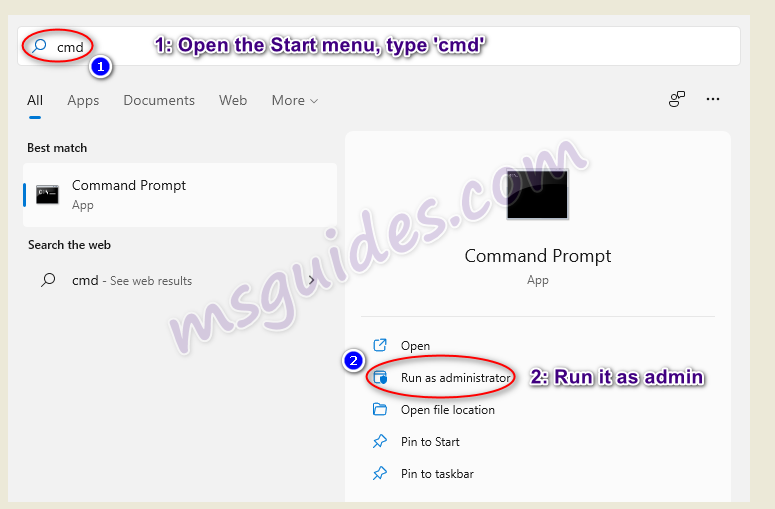
open command prompt app with admin rights
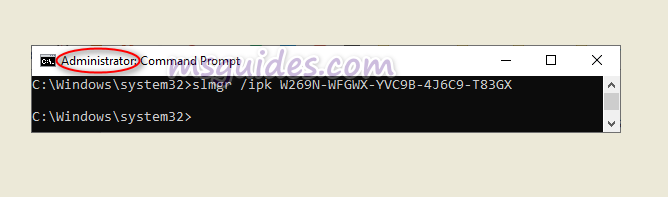
Step 1.2: Install KMS client key.
Use the command “slmgr /ipk kmsclientkey” to install a license key (kmsclientkey is the activation key that corresponds to your Windows edition). The following is the list of Windows 11 Volume license keys.
-
Home: TX9XD-98N7V-6WMQ6-BX7FG-H8Q99
-
Home N: 3KHY7-WNT83-DGQKR-F7HPR-844BM
-
Home Single Language: 7HNRX-D7KGG-3K4RQ-4WPJ4-YTDFH
-
Home Country Specific: PVMJN-6DFY6-9CCP6-7BKTT-D3WVR
-
Pro: W269N-WFGWX-YVC9B-4J6C9-T83GX
-
Pro N: MH37W-N47XK-V7XM9-C7227-GCQG9
-
Education: NW6C2-QMPVW-D7KKK-3GKT6-VCFB2
-
Education N: 2WH4N-8QGBV-H22JP-CT43Q-MDWWJ
-
Enterprise: NPPR9-FWDCX-D2C8J-H872K-2YT43
-
Enterprise N: DPH2V-TTNVB-4X9Q3-TJR4H-KHJW4
Step 1.3: Set KMS server. Use the command “slmgr /skms kms8.msguides.com” to connect to my KMS server.
run command slmgr skms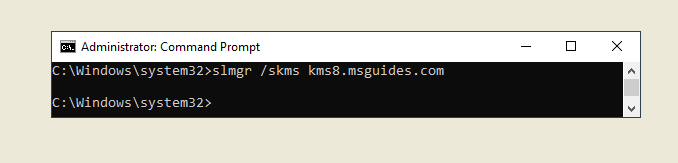
Step 1.4: Activate your Windows. The last step is to activate your Windows using the command “slmgr /ato”.
run command slmgr ato
If you see the error 0x80070005, it means the server is busy. Please try the command “ato” again until you succeed.
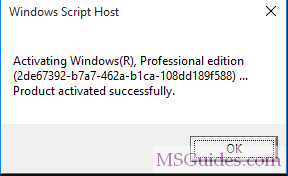
your windows is activated successfully