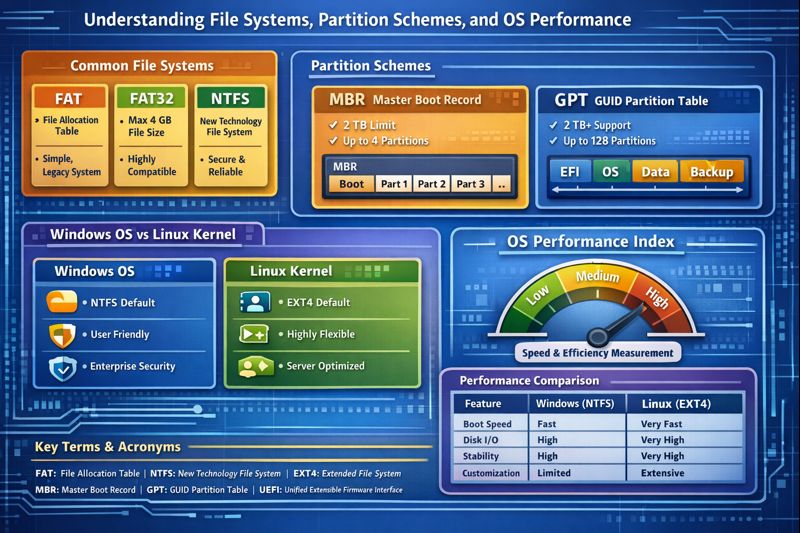
Understanding File Systems, Disk Partitioning, and OS Performance
A Practical Guide for Windows and Linux Users
Introduction
Modern operating systems rely heavily on file systems, disk partitioning schemes, and kernel design to deliver performance, security, and reliability. Whether you are installing Windows, deploying a Linux server, or managing cloud infrastructure, understanding these components is essential.
This article explains:
- Common file systems (FAT, FAT32, NTFS, EXT)
- Disk partitioning schemes (MBR vs GPT)
- Differences between Windows OS and Linux kernels
- Key acronyms and technical terms
- How these factors affect the Operating System Performance Index
1. What Is a File System?
A File System (FS) is a method used by an operating system to store, organize, retrieve, and manage data on a storage device.
Simple Illustration
[ Hard Disk / SSD ]
        |
   [ Partition ]
        |
   [ File System ]
        |
[ Files & Folders ]
Without a file system, the OS cannot understand how data is arranged on the disk.
2. Common File Systems Explained
2.1 FAT (File Allocation Table)
FAT is one of the earliest file systems developed by Microsoft.
Definition
FAT stores file information in a table that tracks where each file is located on the disk.
Key Characteristics
- Very simple design
- No security or permissions
- No journaling
Use Cases
- Legacy systems
- Embedded devices
Limitations
- Easily corrupted
- Poor performance on large disks
2.2 FAT32 (File Allocation Table – 32 bit)
FAT32 is an improved version of FAT.
Key Features
- Maximum file size: 4 GB
- Maximum partition size: 2 TB
- Extremely compatible
Advantages
- Works on Windows, Linux, macOS
- Ideal for USB flash drives
Disadvantages
- No encryption
- No file permissions
- Not suitable for OS installation
2.3 NTFS (New Technology File System)
NTFS is the default file system for modern Windows operating systems.
Key Features
- Journaling (crash recovery)
- File permissions (ACL)
- Encryption (EFS)
- Compression and disk quotas
Illustration
NTFS Volume
 ├── System Files
 ├── User Data
 ├── Permissions (ACL)
 └── Journal Log
Advantages
- High reliability
- Strong security
- Excellent performance for large files
Used By
- Windows 10
- Windows 11
- Windows Server
2.4 EXT File Systems (Extended File System – Linux)
Linux primarily uses the EXT family.
EXT2
- No journaling
- Fast but unsafe during power loss
EXT3
- Added journaling
- Improved reliability
EXT4 (Most Common)
EXT4 Features
- Journaling
- Large file support (up to 16 TB)
- Extents-based allocation (better performance)
Illustration
EXT4 Structure
 ├── Inodes
 ├── Data Blocks
 ├── Journal
 └── Extents
Used By
- Linux desktops
- Linux servers
- Cloud platforms
3. Disk Partitioning: MBR vs GPT
A partitioning scheme defines how a disk is divided before a file system is applied.
3.1 MBR (Master Boot Record)
MBR Definition
A legacy partition table stored in the first sector of a disk.
Key Limits
- Max disk size: 2 TB
- Max partitions: 4 primary
- Used with BIOS
Illustration
[ MBR ]
 ├── Partition 1
 ├── Partition 2
 ├── Partition 3
 └── Partition 4
3.2 GPT (GUID Partition Table)
GPT Definition
A modern partitioning system using globally unique identifiers (GUIDs).
Advantages
- Supports disks larger than 2 TB
- Up to 128 partitions (Windows)
- Redundant partition tables
- Works with UEFI
Illustration
[ GPT Header ]
 ├── EFI System Partition
 ├── OS Partition
 ├── Data Partition
 └── Backup GPT
4. Windows OS vs Linux Kernel
4.1 Windows Operating System
Default File System
- NTFS
Strengths
- User-friendly
- Strong enterprise security
- Optimized desktop performance
Limitations
- Limited native EXT support
- Less flexible kernel customization
4.2 Linux Kernel
Kernel Definition
The kernel is the core of the OS that manages CPU, memory, devices, and file systems.
Native File Systems
- EXT4
- XFS
- Btrfs
- ZFS (via modules)
Strengths
- High performance on servers
- Advanced file system support
- Strong multitasking and networking
5. Operating System Performance Index (OSPI)
What Is an OS Performance Index?
An Operating System Performance Index is a conceptual measurement of how efficiently an OS uses system resources.
Key Metrics That Affect OS Performance
| Metric | Description |
|---|---|
| CPU Scheduling | How efficiently processes are executed |
| Memory Management | RAM usage and swapping efficiency |
| Disk I/O | Read/write speed of file systems |
| File System Type | NTFS vs EXT4 vs FAT32 |
| Boot Method | UEFI + GPT vs BIOS + MBR |
| Kernel Design | Monolithic vs hybrid |
Performance Comparison (Generalized)
| Feature | Windows (NTFS) | Linux (EXT4) |
|---|---|---|
| Boot Speed | Fast | Very Fast |
| Disk I/O | High | Very High |
| Stability | High | Very High |
| Server Load Handling | Moderate | Excellent |
| Customization | Limited | Extensive |
Insight: Linux with EXT4 + GPT + UEFI typically scores higher on the OS Performance Index in server environments, while Windows excels in desktop usability.
6. Acronyms and Terms Defined
| Acronym | Meaning |
|---|---|
| FAT | File Allocation Table |
| NTFS | New Technology File System |
| EXT | Extended File System |
| MBR | Master Boot Record |
| GPT | GUID Partition Table |
| GUID | Globally Unique Identifier |
| BIOS | Basic Input Output System |
| UEFI | Unified Extensible Firmware Interface |
| ACL | Access Control List |
| EFS | Encrypting File System |
| OS | Operating System |
| I/O | Input / Output |
Conclusion
Understanding file systems, partitioning schemes, and OS architecture is critical for:
- System performance
- Data security
- Scalability
- Reliability
Key Takeaways
- Use NTFS for Windows systems
- Use EXT4 for Linux environments
- Prefer GPT + UEFI for modern hardware
- OS performance is deeply influenced by file system and kernel design